
The best personal AI agents are worth comparing by the work you want to hand off. Start with Muse for personal life admin, Claude Duet for ongoing professional work, Poke for help inside a message thread, and Okou for business tasks that end in a usable document, report, or other deliverable. Your existing accounts and access to each product may narrow that choice quickly.
There’s much more to this category than those four names. OpenAI dots, Grok Bot, Cue, and Tasks in Gemini take different approaches to persistent assistance. Smaller brands such as Lucie, J.Doe, Ken, and Instinct are worth examining too. This guide compares their interfaces, current positioning, and access requirements, then maps the wider market.
Reviewed November 18, 2026. This article was prepared for Okou, which is included in the comparison. We inspected public product interfaces, demonstrations, documentation, and entry flows. We also inspected Okou’s authenticated staging workspace, with its main UI captured on November 19. We did not run an identical end-to-end task in every product. Recommendations concern product fit and visible design, rather than measured task success or speed.
Best personal AI agents at a glance
| Personal agent | Start here if you want… | What stood out in the UI review | Access consideration |
|---|---|---|---|
| Meta Muse | One assistant for everyday tasks and longer-term goals | An activity history and a separate place for goals | Limited testing; account and location restrictions apply |
| Claude Duet | A persistent assistant for professional work | Chat, Tasks, and Make, plus explicit decision cards | US waitlist for eligible paid individual Claude plans |
| OpenAI dots | Ongoing help connected to your ChatGPT context | An activity view for work happening in the background | Plan and regional rollout restrictions |
| Tasks in Gemini | Help grounded in your Google accounts | A visible switch from Chat to Task | New rollout; advanced features start in the US |
| Grok Bot | Several agents working under one point of contact | A primary Bot summarizing what other Bots need | Check current account eligibility and usage terms |
| Cue by Manus | Agents with their own communication identities | An agent list, group chat, and separate phone, mail, wallet, and computer | Early-access terms and invitation availability need checking |
| Okou | Cross-app business work and finished deliverables | A persistent sidebar separates Chat, Workflows, Connectors, Artifacts, and Channels | App access and usage credits determine what can run |
| Poke | A personal assistant you can text | A familiar messaging thread | Phone onboarding and channel eligibility |
| Martin | Scheduling and inbox assistance across channels | Scheduling, phone briefings, and draft status are explicit | Annual equivalents differ from monthly prices |
| Lindy | Recurring client and administrative work | A daily brief that surfaces work needing attention | Plan credits and account connections matter |
| Lucie | Personal context across iPhone and Mac | Proactive cards, approval moments, and documented memory review | Device permissions and supported integrations |
| J.Doe | Follow-through from conversations and business context | A progression from context to proposed work | App beta; announced hardware is a separate future product |
| Ken | A persistent assistant with a cloud computer | Demo messages separate “Done” from “Needs you” | Included AI credits are for trying it; check ongoing model costs |
These are starting points, not a universal ranking. A travel assistant and a business assistant can both be useful without being substitutes.
What is a personal AI agent?
A personal AI agent is an assistant that retains useful context about you and can act through connected tools over time. It may manage a task in the background, return with a result, or ask for a decision. The important buying questions are what it can access, what it can change, and how you stop or correct it.
We looked for a recognizable personal-assistant product with continuing context, delegated actions, or proactive follow-through. Specialist personal agents appear in the directory with their narrower scope identified. General chat apps, automation builders, and developer frameworks aren’t interchangeable with this category.
Four questions shaped the interface review:
- Where does the work live? In a conversation, a task list, a computer session, or a separate output library?
- What context carries forward? Preferences, previous conversations, connected accounts, or a reviewable memory?
- How do you stay in control? Look for draft review, spending limits, task status, and a clear way to pause work.
- What can you access today? A public demo, invitation-only app, and generally available account are different levels of access.
Muse: a visible record of everyday work
Muse deserves a place near the start of a personal-agent comparison because its public guided tour makes the relationship between small tasks and ongoing goals unusually concrete.
The activity screen is the useful part. It lists actions such as emailing a carrier, organizing moving documents, and booking movie tickets. The tour also shows a separate Goals area. That distinction gives you somewhere to check what happened and somewhere to keep an intention that lasts longer than one chat.
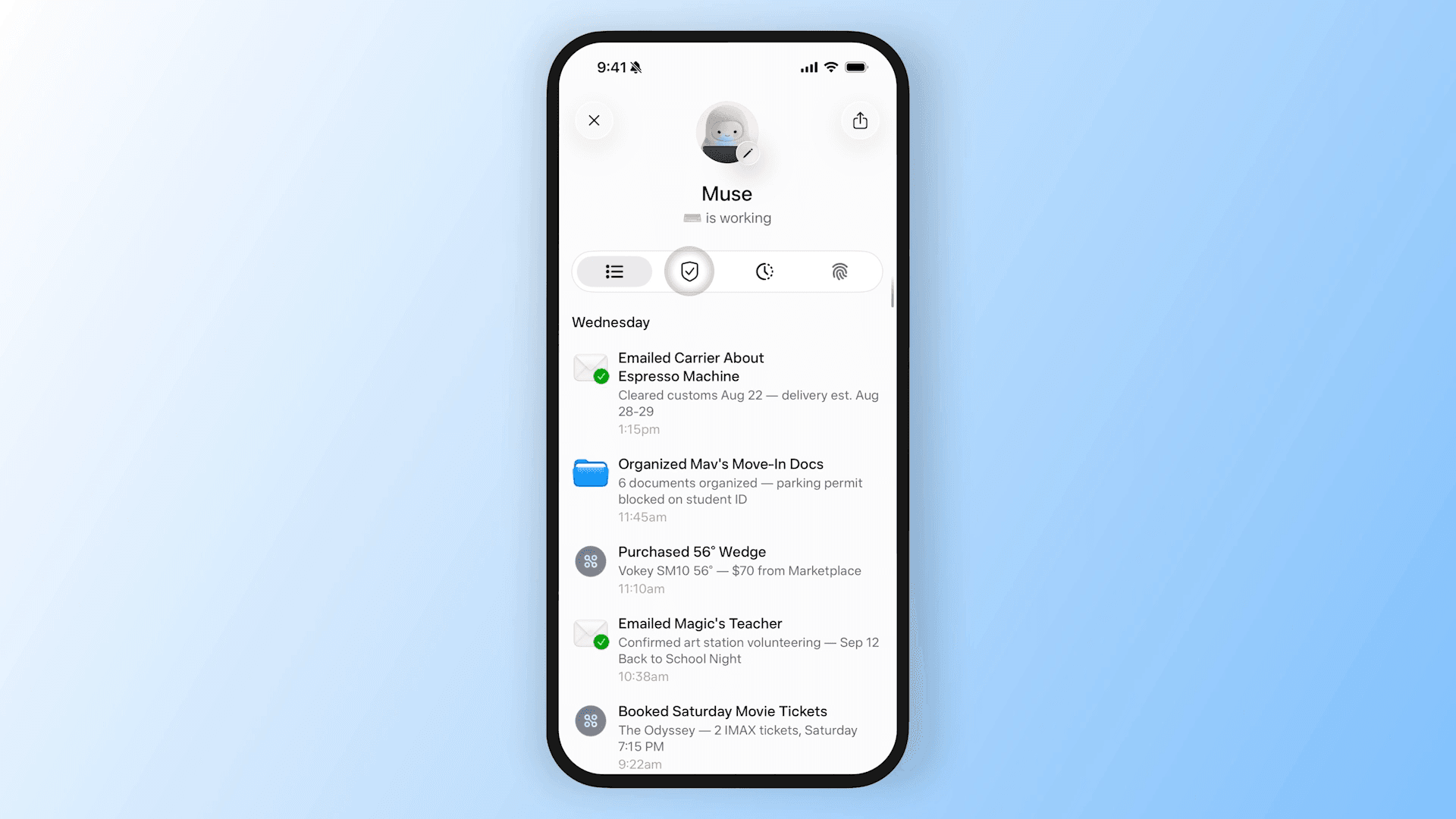
Official Muse tour, reviewed November 18. The actions shown belong to Meta’s demonstration; we did not reproduce them.
Meta’s current help documentation describes a main chat and side chats that share context, reminders, and a library for created files. That is a useful fit for someone whose requests jump between personal admin, research, and making things.
The limit is access. We reached the live sign-in surface and reviewed the public tour, but did not enter a personal Meta account. Meta lists a free allowance, Power at $20 per month, and Maximum at $100 per month. Muse remains in limited testing, so check eligibility before treating those plans as available to you.
Choose Muse to evaluate: ongoing life admin with visible activity and goals. Test whether its memory reflects your preferences accurately before giving it broader responsibility.
Claude Duet: decisions have a place to go
Claude Duet has one of the clearest structures in the reviewed demonstrations: Chat, Tasks, and Make. A conversation can continue while work and finished artifacts have their own places.
The email approval card is particularly useful. In the public demo, Duet prepares a message containing a deck and data-room link, then displays the recipient, subject, and body above Not now and Send. You can inspect the action at the point where it becomes an external commitment.
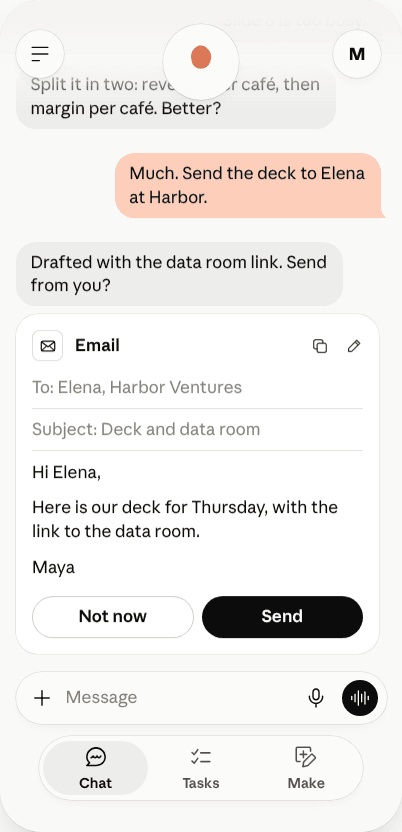
Anthropic’s interactive product demonstration, captured November 18. No email was sent during this review.
That design fits a founder, consultant, or operator who wants research and preparation to continue without losing the final decision. It also gives “proactive” a concrete meaning: work can arrive as a decision to review.
The access documentation matters as much as the demo. Duet is on a US waitlist for Pro, Max, and Ultra subscribers, and isn’t available on Team or Enterprise plans. Background work counts toward plan usage. The documentation also distinguishes its cloud computer from a browser session you can watch and take over.
Choose Duet to evaluate: continuing professional work with a clear approval queue. Don’t assume a paid Claude account includes immediate Duet access.
OpenAI dots: continuing context, with an activity trail
OpenAI dots is the relevant product when your question is about a persistent personal agent inside OpenAI’s ecosystem. Comparing only the ordinary ChatGPT chat screen would miss that distinction.
OpenAI describes a dot as having memory and its own cloud computer, with an Activity View for inspecting its work. Its published UI shows a named assistant handling an ongoing request while keeping task activity visible. That combination is worth looking at if you already have useful context in ChatGPT and want to delegate work over time.
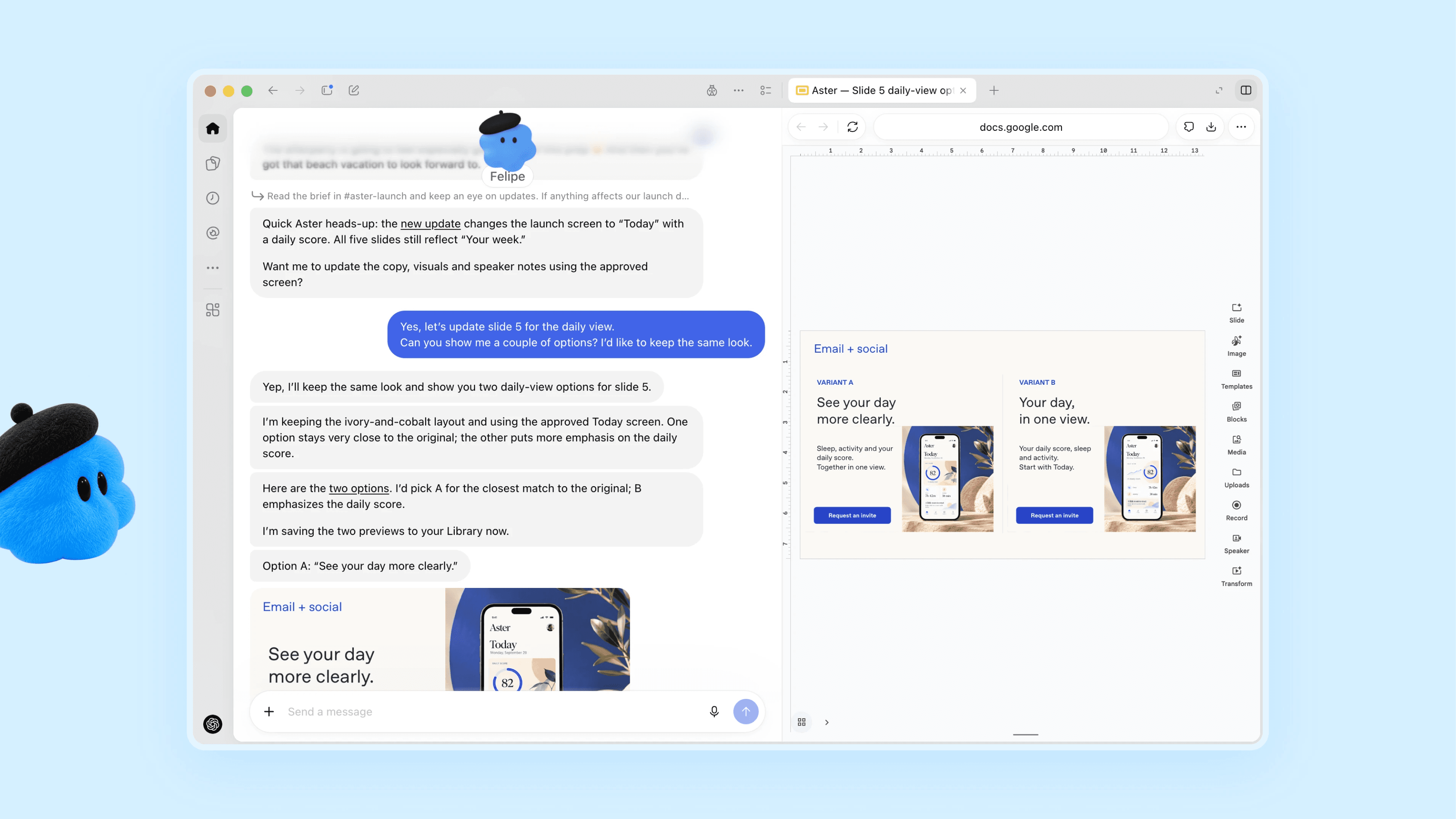
Official OpenAI product image, retrieved November 18. This is source UI, not a task executed in our account.
The getting-started guide describes permission controls and limits around proactive work. It also makes eligibility a consideration: rollout depends on your plan and region, with exclusions affecting personal accounts in the EEA, UK, and Switzerland at the time checked.
Choose dots to evaluate: continuing work within your existing ChatGPT context. Check the available product mode and billing terms rather than assuming every ChatGPT subscription behaves the same way.
Tasks in Gemini: check the current product name
Google’s November 17 announcement changes how this category should be covered. Its current consumer entry point is Tasks in Gemini, with a Chat / Task switch on the home screen. Older comparisons centered on Gemini Spark need a fresh check.
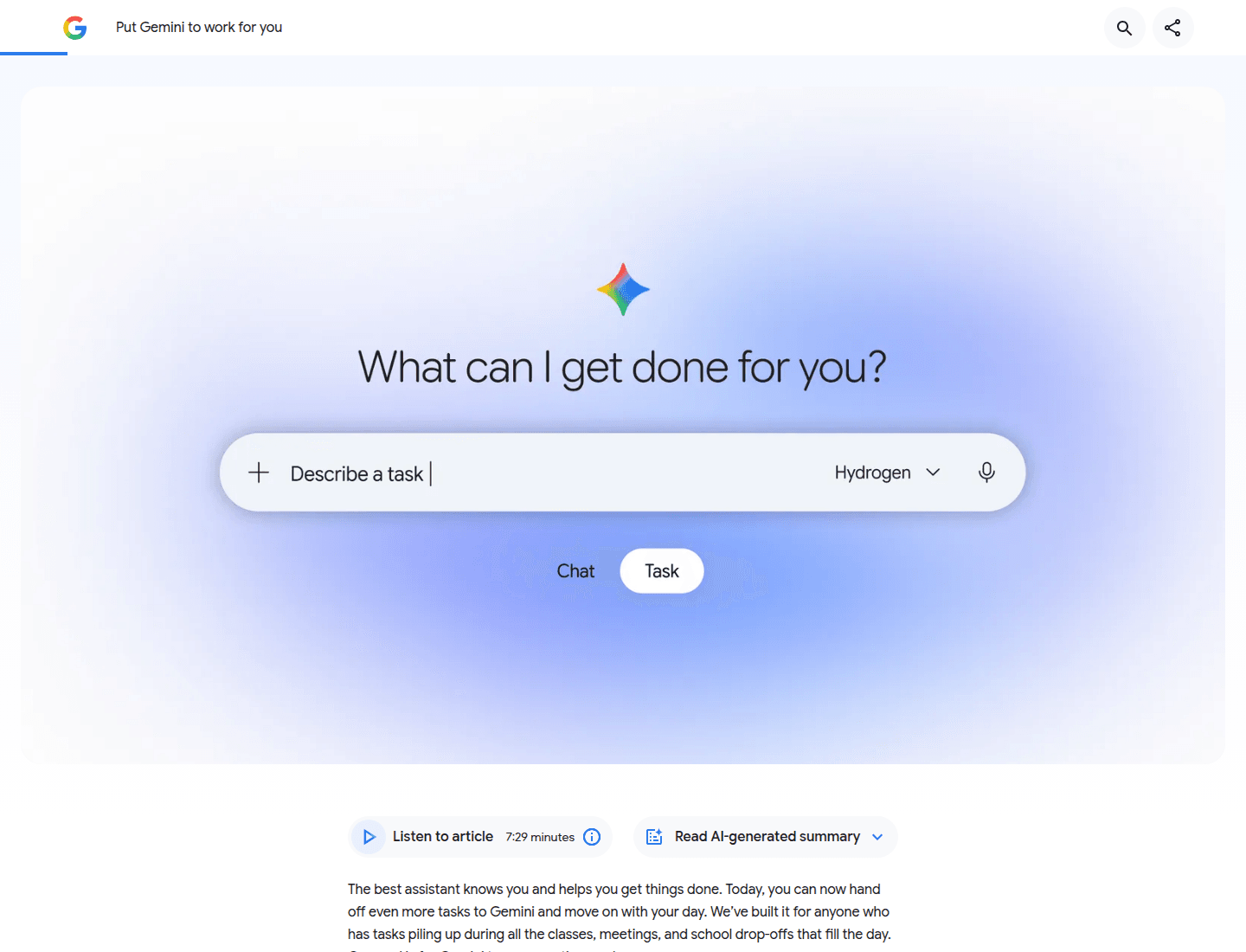
UI from Google’s November 17 announcement, captured in the browser on November 18.
The announcement describes calls, shopping, calendar work, and help using connected Google context. It explains approval and pre-approval settings for purchases, including spending caps. Text messaging and email forwarding provide additional ways to hand off a request in supported regions.
The practical appeal is your existing account context. If your calendar, files, and email already live with Google, there may be less information to move into another service. That establishes a reason to try it first, rather than evidence of a better completion rate.
Google says the update is rolling out free of charge across six countries, with advanced features starting in the US. Some calling features have state restrictions, and texting requires an eligible US number and carrier.
Choose Tasks in Gemini to evaluate: daily tasks connected to Google accounts. Confirm the feature has reached your account before comparing it with a standalone subscription.
Grok Bot and Cue: one assistant, or a team you can talk to?
Grok Bot and Cue make the identity of individual agents part of the interface.
Grok Bot’s public demonstration shows a Chief of Staff alongside other Bots. A single response summarizes changes to the calendar, a prepared brief, and replies waiting for approval. That makes a primary Bot useful as a place to ask, “What needs me?” The design question is whether delegation remains understandable as more Bots are added.
Cue gives the idea a different shape. Its agent list and group-chat controls sit beside a product model in which each agent can have its own phone number, email address, wallet, and computer. Manus’s launch announcement positions Cue as a standalone app, separate from the main Manus workspace.
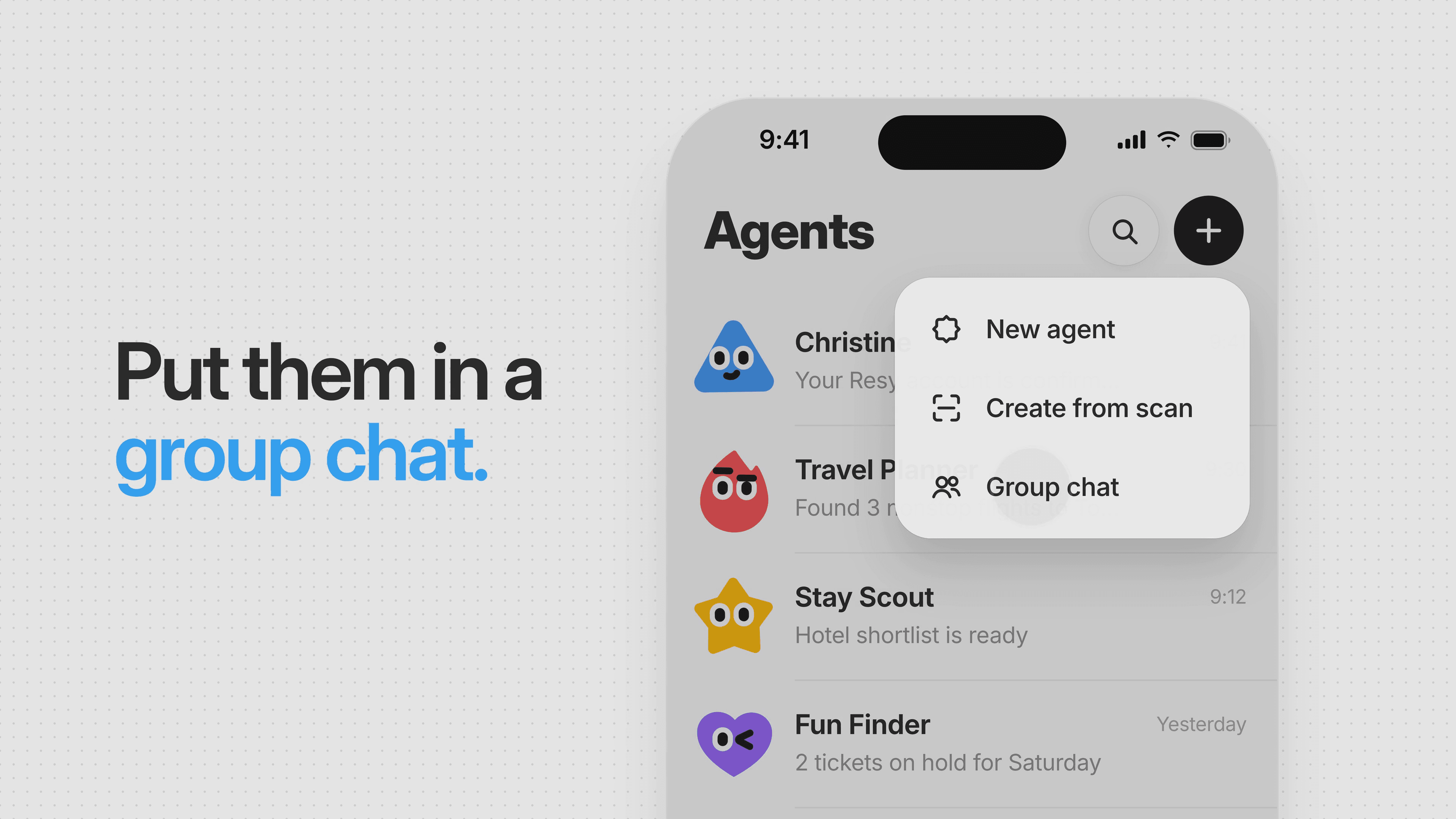
Frame from Cue’s official product tour, reviewed November 18. The demonstration is illustrative.
The benefit is explicit delegation. You can give different jobs to different agents and bring them into a shared conversation. The cost is more identities and permissions to understand. Before adopting either product, inspect which agent holds a permission, how work is handed over, and where you review the result.
Cue launched with limited free invite-code access. Its current site offers desktop and mobile entry points, but we did not establish that every new account can enter today. Grok Bot’s current account eligibility and price should also be checked directly.
Okou: start from the work and its deliverable
Okou is particularly relevant to business users who want work completed across apps and returned in a useful format.
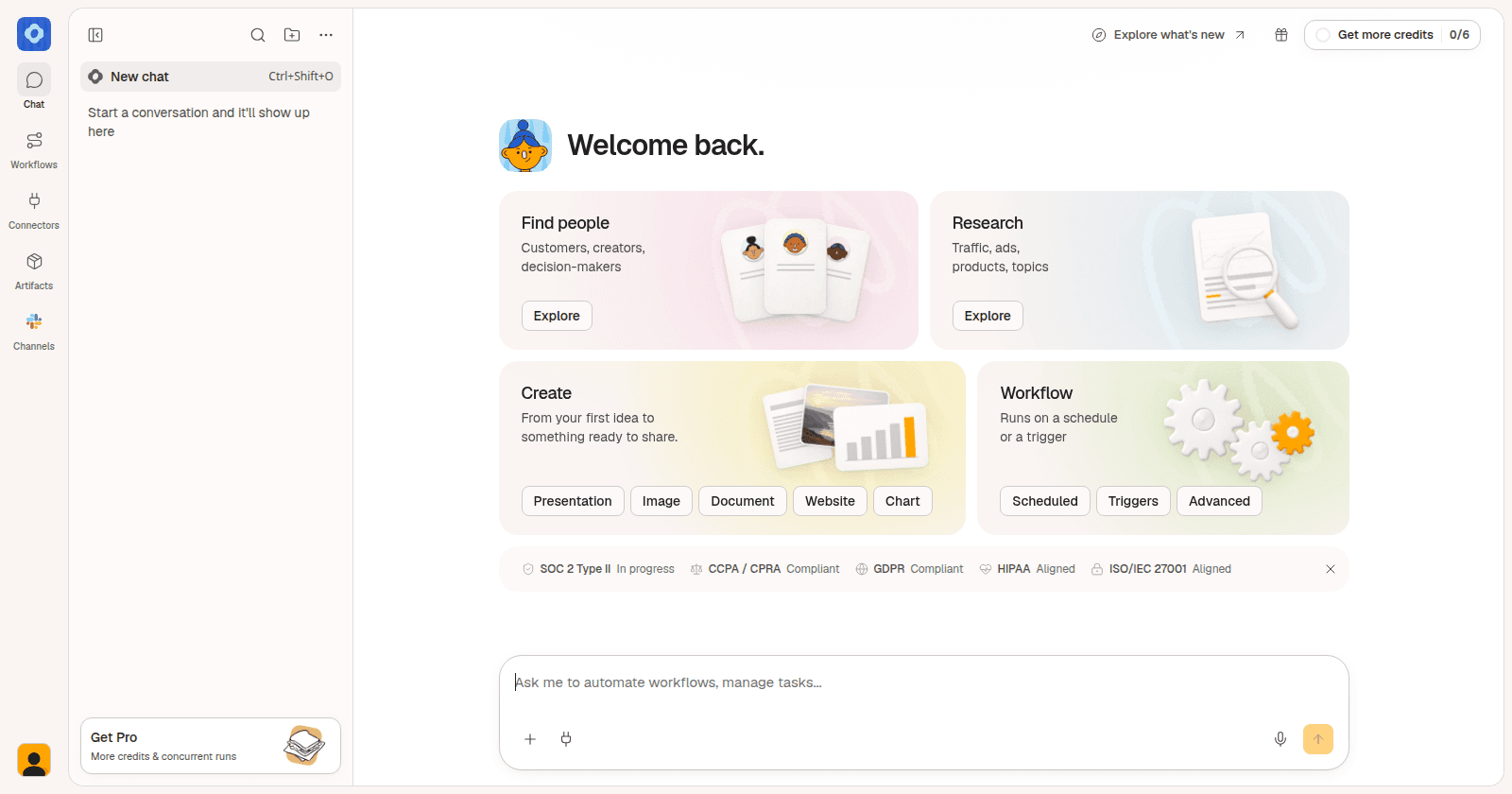
Its main workspace keeps Chat, Workflows, Connectors, Artifacts, and Channels in a persistent sidebar. The home screen offers four starting points: Find people, Research, Create, and Workflow. A message composer stays below them, so you can describe a task directly or start from a suggested type of work.
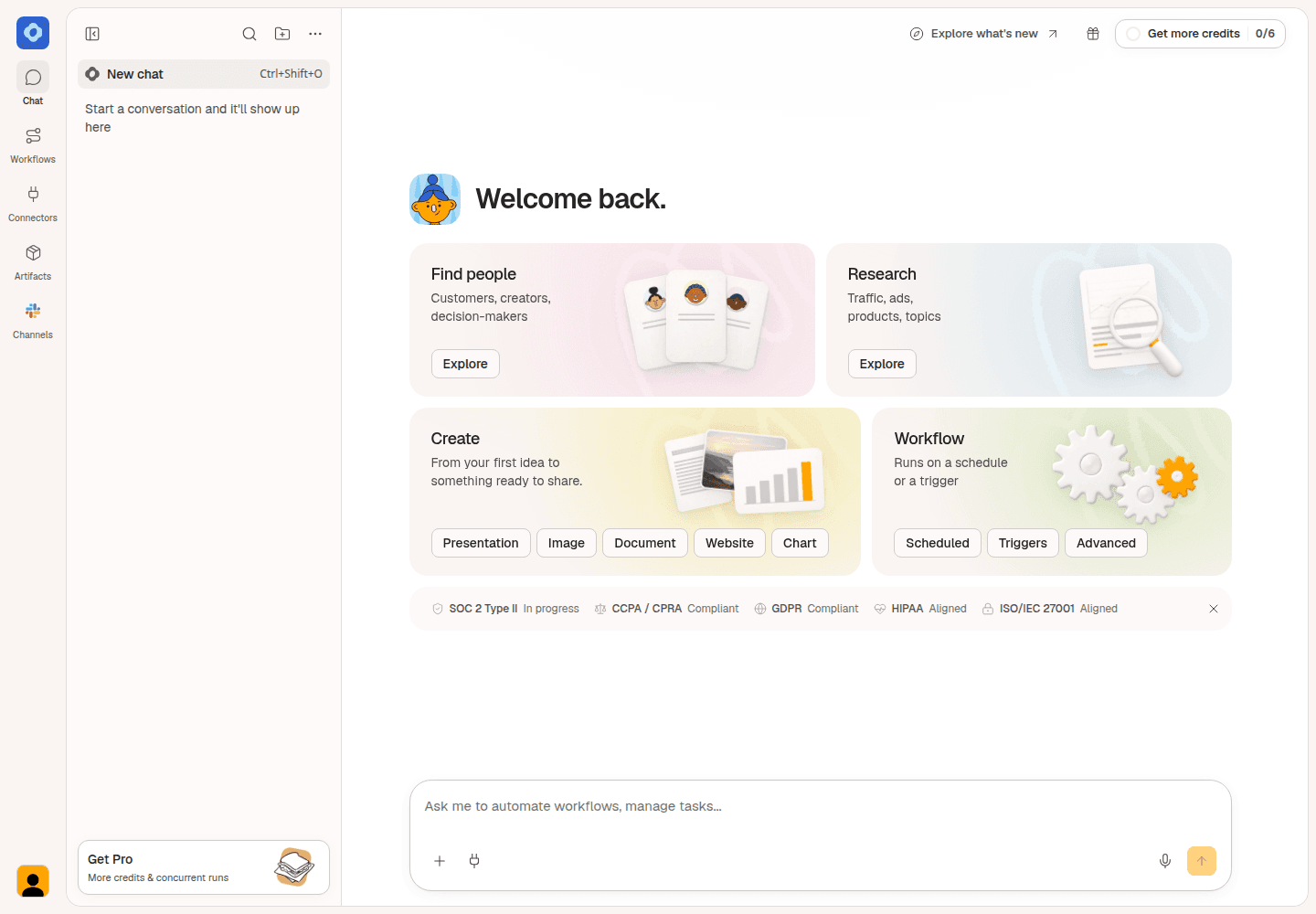
Main workspace captured directly from Okou’s authenticated staging app on November 19. This is a fresh test workspace; no task result is shown.
The Create card names the output choices: presentation, image, document, website, and chart. Workflow has separate entry points for scheduled tasks, triggers, and advanced workflows. For an operator, this makes the starting decision practical: find someone, investigate a topic, make a deliverable, or set up recurring work.
The sidebar also gives connections and artifacts their own destinations. That structure matters once an assistant is doing more than answering a question: you need places to manage access and find the work it produces.
There is setup involved. App connections, access duration, and usage credits need attention. We inspected the main workspace using a test account without connecting real business accounts, so this comparison doesn’t score downstream execution quality. Current pricing starts Pro at $20 per month, with credits and package choices affecting usage.
Choose Okou to evaluate: recurring business work and deliverables across your tools. Start with one useful task and a clear output, then expand the access you grant as needed.
Poke, Martin, and Lindy: assistance close to your inbox
Poke
Poke keeps the front door familiar: add an assistant to the messaging habits you already have. Its public phone UI presents a continuing exchange with personal context, while the web flow starts with a phone number.
That is a low-friction shape for reminders, follow-ups, and everyday requests. The harder question is where you inspect active tasks, remembered context, and permissions once the thread gets busy. Test those controls rather than judging the product only by how naturally it replies.
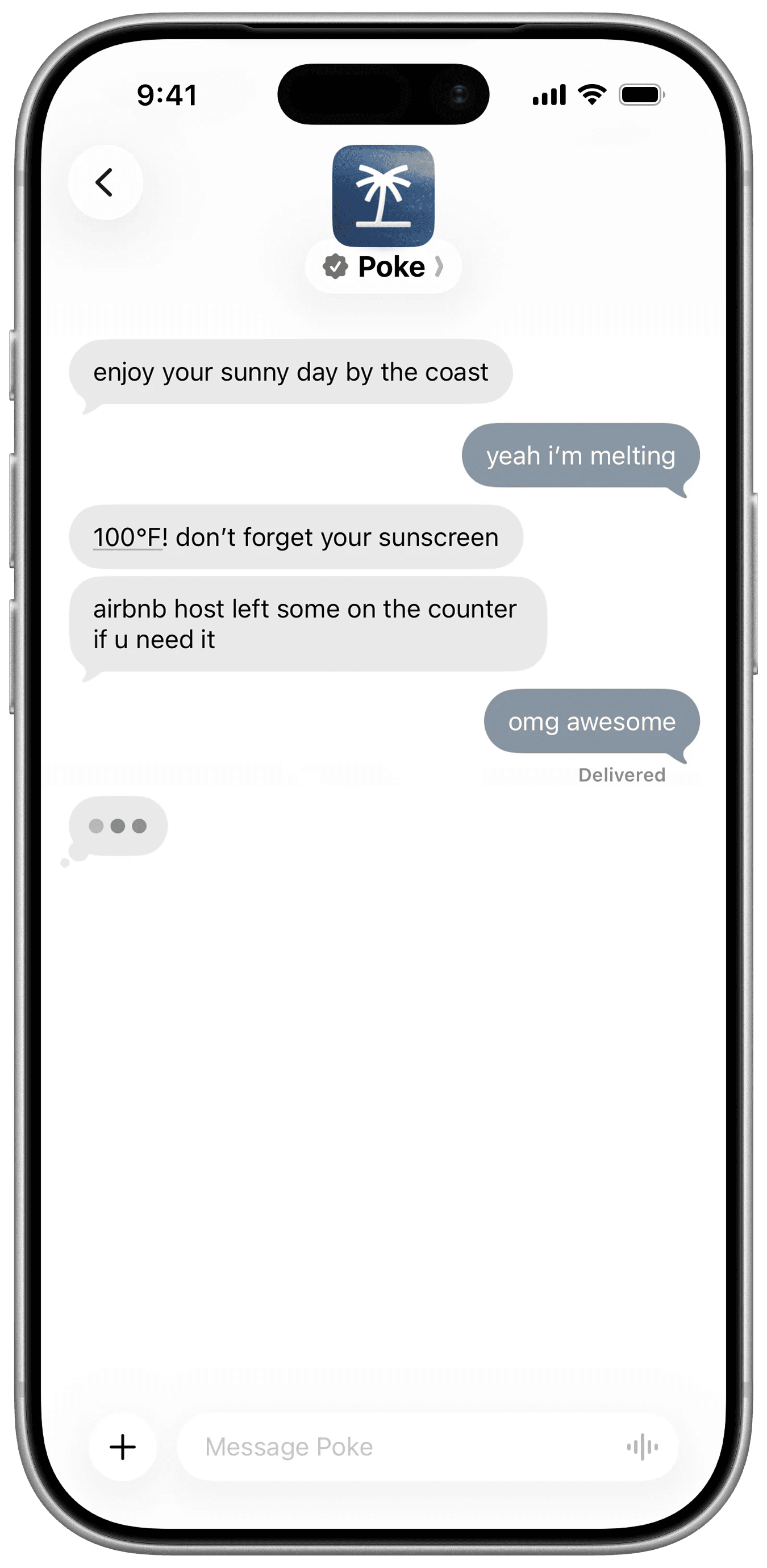
Official product image, retrieved November 18. The conversation is a demonstration.
The current site announces that Poke is joining Cognition. Its displayed monthly tiers are Free, Pro at $19, and Ultra at $199. Treat the announcement as a reason to check current product and plan details, rather than assuming a shutdown or an undocumented change.
Martin
Martin makes specific administrative jobs easy to see. Its product screens show copying Martin into an email to schedule, a phone briefing, and inbox items with draft status.
That matters if you want an assistant to fit into existing work rather than becoming another destination you must check. Scheduling by email also gives the other participant a familiar channel.
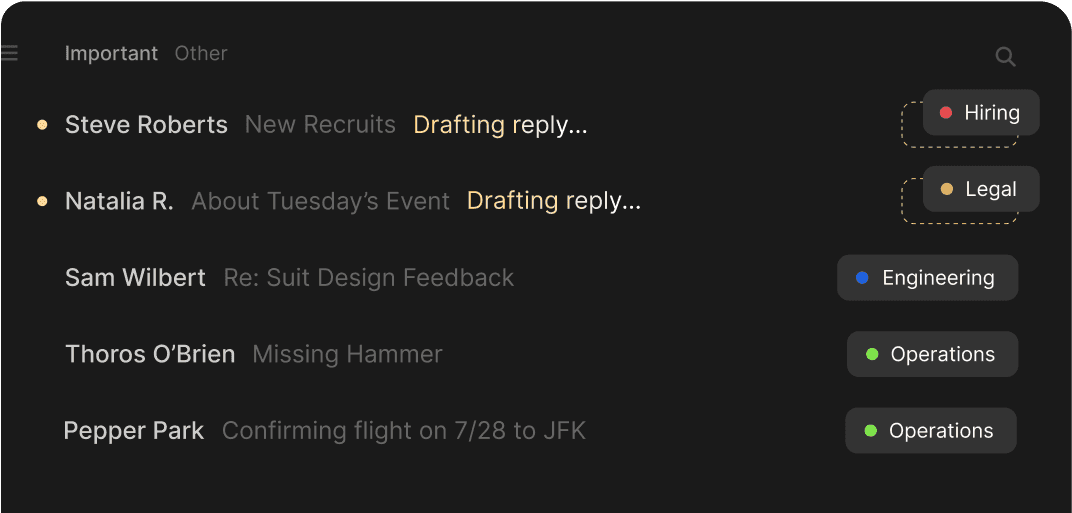
Official Martin product image, retrieved November 18. We did not connect a mailbox or test delivery.
Watch the billing presentation. Basic is listed at $35 on monthly billing, versus a $21 monthly equivalent billed yearly. Pro is $49 monthly, versus a $30 annual-billing equivalent. Those are different commitments.
Lindy
Lindy is worth comparing if recurring client and administrative work is the main problem. Its current public demonstration includes a daily brief with work performed and items that need attention, alongside examples for leads, proposals, invoices, and client reports.
We inspected its public entry flow and current site. Mobbin also supplied a Lindy workspace reference showing agent status and integrations, but did not supply its capture date. It is a historical reference, rather than confirmation of the current app version.
Lindy’s pricing page lists plans from $29.99 per user per month. Check credits, connected accounts, and billing for active users against the work you intend to delegate.
Personal-agent brands emerging on X
X is useful for finding new products quickly. A launch post can lead to a product site, an app listing, or a usable demo. It can also lead only to a waitlist. We followed the source trail before adding these brands to the comparison.
Lucie: context across your devices
Lucie combines personal context across iPhone and Mac. Its current App Store listing makes that idea concrete: “I want to be more present with my family in the evenings” becomes a saved intention, a week view, and a choice between Not now and Move them. A preference leads to a decision you can inspect.
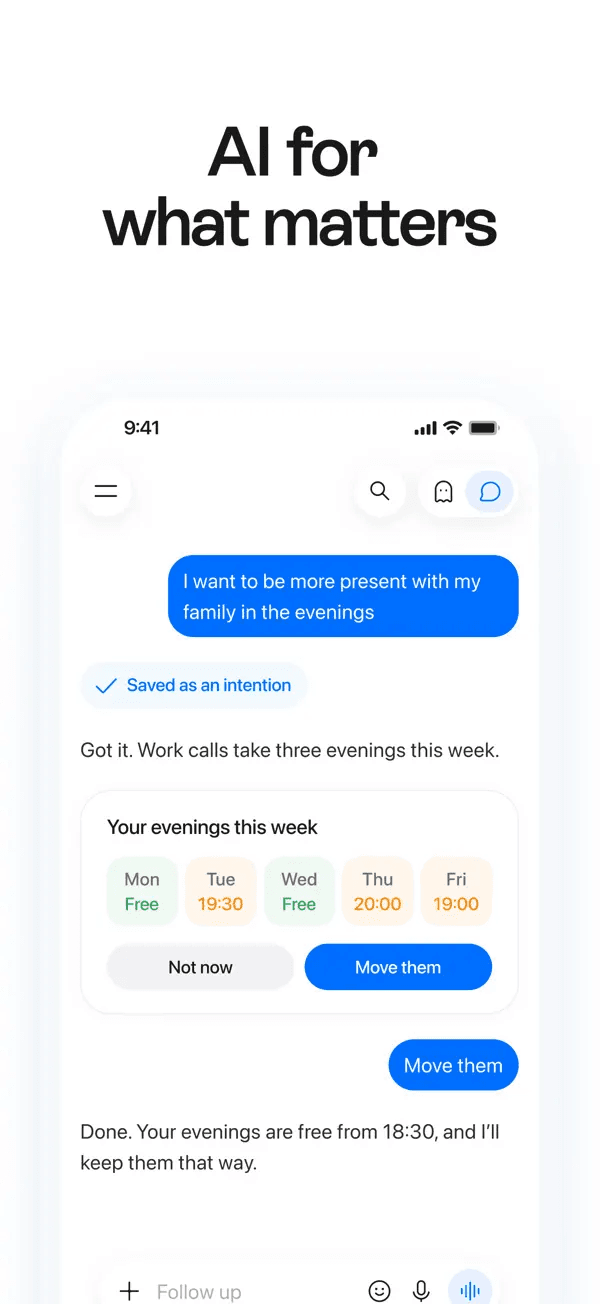
Official Lucie App Store screenshot, retrieved November 18. This is a product example; we did not install the app or move a calendar event.
Its feature documentation also describes memory review, pause and stop controls for computer tasks, saved tasks, and review of task outputs. Those are useful things to inspect during a trial. Device pairing and supported account permissions determine how much context is available.
J.Doe: turn a conversation into the next action
J.Doe starts from conversations and connected business context. Its public sequence connects a call about expansion plans with a company profile, then proposes research, a report, and a briefing email.
The useful detail is the separation between preparing work and sending it. One stage says “Ready. Nothing sent.” That language gives a founder or consultant a clear review point.
We inspected the public sequence and reached the sign-in and invitation surface. The app is in beta. Its proposed O1 device is listed for early 2027, so the hardware should not be presented as a product we used today.
Ken: show what is done and what needs a person
Ken offers a personal assistant with a cloud computer, memory, scheduled work, and Telegram access. Its public examples divide a morning update into Done and Needs you. A drafted reply has a Review control, while an account issue has a Fix control.
That is a useful distinction for unattended work: completion and a request for human input should look different.
The cost model needs a careful read. Ken says included AI credits let you try it, but generally won’t cover a month of daily use; you can connect a supported AI subscription or choose its own offering. Its computer can sleep and wake for scheduled jobs. We reviewed those public claims and demonstrations, without provisioning a computer.
Instinct: familiar messages, limited access
Instinct describes an assistant you text or call that can use a phone and computer. Its current public site is sparse, so the latest authenticated interface could not be established from the site alone.
A third-party walkthrough posted by Greg Isenberg on September 15 shows a restaurant-booking exchange and a separate card for securely adding payment details. That is useful historical UI evidence, with a clear date limitation. We did not verify the same flow in a current account.
Instinct belongs on the shortlist for personal errands if you can get access. Invitation availability, current pricing, and the present app version still need confirmation.
Atlas and Jett: travel deserves its own interface
Atlas’s founder launch video shows place cards with Shortlist, Details, and Ask Atlas controls. That gives you a way to preserve options while continuing the conversation. Its public site still leads to an invitation request, so we did not enter the beta.
Jett’s November 17 product video goes further into comparison. It starts from a meeting in the calendar, asks whether the trip should extend beyond that meeting, then offers separate flight and hotel review cards. The website also exposes the factors behind its example flight scores.
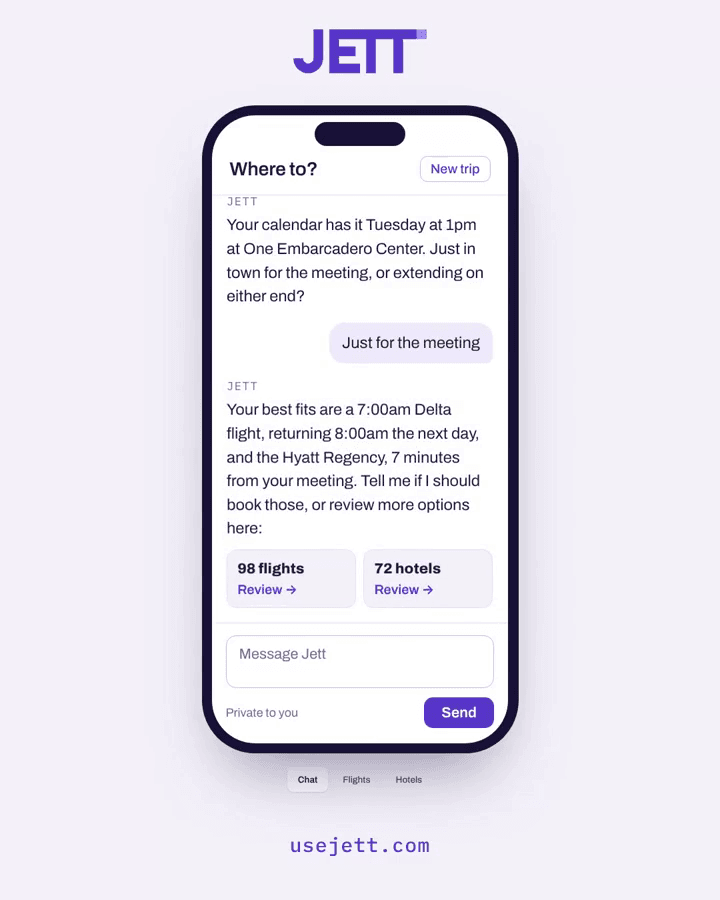
Jett’s first-party X demonstration, posted November 17 and reviewed November 18. Example counts and recommendations are demo data.
For frequent travel, this is a reason to compare a specialist with a general personal agent: you may want to inspect alternatives visually before authorizing a booking.
The wider personal-agent market
The following brands have narrower jobs or less public evidence. Each has a linked source and a stated review limit. A demonstrated booking or purchase is an example from the product, not a booking or purchase we completed.
Messaging and everyday follow-through
| Brand | What the public product shows | What to check before choosing it |
|---|---|---|
| Pally | A personal assistant reached by text, with a phone demonstration | The site displayed a heavy-volume notice during review; response quality was not tested |
| Fo by Wajo | Calling, booking, and purchasing, with human help when needed | Understand when a person joins the work and how purchases are approved |
| Lucas | Reservations, appointments, and refunds over text | Public film shows a check-in card; current authenticated app build untested |
| Rene | Morning context, focus, and coordination through messages | Check which accounts and shared conversations supply context |
| Iris | A phone thread for briefings, email, reminders, and plans | Phone onboarding is visible; sending and booking examples remain vendor demonstrations |
| Caddy | Reminders, calendar context, and follow-ups in Messages | Check beta availability and how completed work is recorded |
| Brea | iMessage requests and a browser-task demonstration | Connected-app breadth does not establish that every task succeeds |
| Tab | Separate examples for restaurant booking, phone calls, and flights | The account flow uses a phone number; verify access and payment controls |
| Orchid | A personal-assistant message thread and connected services | The current homepage directs new users toward Keiki; confirm which offering you’re buying |
| Sundae | A personal assistant with its own computer and messaging entry points | The site labels it beta; check which integrations are available now |
| tinyNature | A WhatsApp-style assistant with email and delegated tasks | Public examples don’t establish performance of each advertised internal agent |
| szn | A sequence from a message to calls, follow-ups, and a result | Short public demos reviewed; pricing and account eligibility were not established |
| Zapia | App, web, and WhatsApp entry points, plus scheduled tasks | Check supported language, region, and connected-account limits |
| WeClaw | Choose a personality or build your own, with a team behind the agent | A persona choice doesn’t establish different task performance |
| Chottu | India-focused requests by message, photo, or voice, with UPI described for payment | Check location, merchant support, and payment confirmation |
Money, calls, travel, and shared life
| Brand | What distinguishes it | Review limit |
|---|---|---|
| Boski | Subscription cancellations, bill negotiation, and refunds | Public task examples inspected; no savings claim independently verified |
| Asmi | A visible sequence of call attempts and follow-ups for a cancellation | The sequence is a website demonstration, not our call log |
| Mitra | Phone coordination, with incoming and outgoing call examples | Call results and consent handling were not exercised |
| asaply | A coffee-order demo ends at a visible payment-confirmation card | Public interactive example inspected; no payment or errand completed |
| Atlas by Voyage Labs | Planning, booking, and monitoring trips and experiences | Founder’s November 17 launch video shows shortlists and Ask Atlas controls; direct beta access untested |
| Jett | Flight and hotel cards that expose reasons behind a recommendation | Scoring examples reviewed; waitlist access and booking reliability remain untested |
| Tomo | Personal conversation, goals, reminders, and group coordination | A heavy-load notice appeared on the site during review |
| HireAlpha | Friend, Coworker, and Cofounder personas in separate threads | Compare the per-persona price with the role you need |
| Folk | Social characters with reminders, shopping, and everyday help | Social positioning differs from a dedicated business operator |
| Boba | One-to-one and group planning, with booking after your agreement | Check what the group shares and who approves an action |
| Wabi | Shared plans and tasks with people close to you | App Store screenshots reviewed; iPhone app not installed |
| Ohai | Family calendars and household coordination | A focused household option; not a substitute for every professional task |
Device-based and more configurable options
| Brand | Why it belongs in the scan | What changes the decision |
|---|---|---|
| Comma | Persistent tasks, routines, and a cloud computer, with Mac context | Distinguish cloud work from work requiring your local Mac |
| Eney | Mac and iPhone assistance tied to personal context | Inspect device requirements; product presentation doesn’t prove every operation stays local |
| Halo | An iPhone briefing connecting personal sources and supporting actions | The app price is separate from any AI-provider costs |
| Underdog | An on-device personal AI with email, calendar, and dictation in its public UI | Invite-only beta; local-processing claims not independently audited |
| OpenHuman | A desktop personal AI with memory, connections, and workflows | Free software can involve inference costs; model providers affect data flow |
| Linger | A desktop personal-agent project built around local models and memory | Setup and hardware needs are more involved; inspect its actual license |
| Skye | Personal briefings presented on a phone’s home screen | Verify how far it can act beyond presenting relevant information |
Two adjacent products are recorded separately: SPIRITT currently emphasizes company work and a cloud workspace, while Sensei by Kosuke puts coding-agent decisions across devices. Dola is also a research lead, but its site returned a region-restriction page in this environment. That prevents a current UI assessment here; it does not establish worldwide unavailability.
How much does it cost to have a personal AI agent?
The subscription is only one part of the cost. Some products bundle limited usage, some count credits, and some let you bring an existing AI subscription. Purchases made on your behalf are a separate expense.
| Product | Price checked on November 18 | Read the terms for… |
|---|---|---|
| Muse | Free allowance; Power $20/month; Maximum $100/month | Usage allowance and regional availability |
| Claude Duet | Included for eligible paid individual-plan access; waitlist applies | Background usage counts toward Claude limits |
| Tasks in Gemini | New rollout announced free of charge | Feature and regional availability |
| Okou | Pro from $20/month | Credits, packages, and concurrency |
| Poke | Free; Pro $19/month; Ultra $199/month | Plan and channel limits |
| Martin | Basic $35/month; Pro $49/month on monthly billing | Lower equivalents require annual billing |
| Lindy | From $29.99/user/month | Credits and active-user billing |
| Halo | $69.99 one-time US price after a seven-day trial | Separate AI-provider costs may apply |
Prices are displayed US-dollar amounts where stated, not a personalized checkout quote. Prices not supported by a reliable current source are omitted from this table.
Which AI agent is best for me?
Pick the product that fits one recurring job you already have. For everyday personal admin, compare Muse with a messaging assistant such as Poke or Martin. For professional work, compare Duet, Okou, and Lindy. For a task grounded in Google or ChatGPT context, check Tasks in Gemini or dots first.
Then give your shortlist the same bounded request. For example: “Prepare a brief for tomorrow’s meeting from the documents I select. Link the evidence, list missing information, and draft a follow-up without sending it.”
Compare the output and the work needed to get it. Could you tell what was happening? Did it ask for the right decision? Could you correct it? Was the result ready to use? A smaller product can be the right choice if it handles your job with less supervision.
Can ChatGPT be used as a personal assistant?
Yes. It can help with personal planning, research, writing, and supported delegated work. Capabilities depend on the product mode and your account. If you want continuing context and proactive work, inspect dots and its eligibility rather than assuming a standard chat has every personal-agent capability.
Do personal AI agents work when my laptop is closed?
Some run in a cloud environment and can continue without your laptop. Others need a local device for particular tasks. Ask where the specific action runs: a cloud assistant may still need your Mac to access a local file, and a local-first app may still call a remote AI provider.
Can a personal AI agent send messages or spend money?
Some can, subject to their tools and your permissions. Look for a reviewable draft, recipient details, payment confirmation, and a clear spending limit. A screenshot that says “Booked” or “Sent” demonstrates a product’s presentation; a real receipt or confirmed account state establishes that an action happened.
If your first priority is business work across your apps, try Okou with one task and a defined deliverable. You’ll have a better basis for choosing an assistant once you can judge the work it returns.

